
Instead of manually re-entering peptide order details, connect peptide orders to lab procurement software through an approved import workflow that matches supplier confirmations to purchase orders. For Peptides777 purchases, start with documents your laboratory receives; add automated order updates only when the supplier authorizes the connection.
- Connect peptide orders to lab procurement software through approved imports before adding supplier-authorized automation.
- Peptides777 research peptides belong in laboratory procurement workflows, not clinical purchasing pathways.
- Match purchase orders, supplier order references, and receiving records without treating them as interchangeable.
- Keep received quantity separate from research release status; an order confirmation does not establish material acceptance.
Why this matters
A supplier order and a laboratory purchase order describe different events. Your purchase order records what the laboratory authorizes; the supplier confirmation records what the supplier acknowledges. Neither establishes what your receiving team actually accepts.
Peptides777 is best suited to laboratory buyers sourcing research compounds, not buyers procuring products for human use. Its stated scope is laboratory and scientific research, so your procurement records should preserve that distinction.
For a 2026 procurement setup, the useful connection is not simply an order appearing in another application. It is a traceable relationship between authorization, supplier acknowledgment, receipt, and the documentation your laboratory requires.
Before you start
- Confirm procurement access and import support. You need permission to create or update purchasing records, a supplier record, and the destination system’s documented import format or API specification. Use a test environment when available.
- Gather purchasing materials. Collect the approved purchase order, supplier confirmation, line-item identifiers, quantities, units, and any receiving documents already supplied. Identify who owns purchasing approval and who owns material acceptance.
- Resolve the access gotcha first. A customer account does not grant access to a supplier’s WooCommerce administration, API keys, or webhooks. Build around buyer-accessible records unless the supplier explicitly authorizes another method; never request shared administrator credentials.
Do not assume the destination system accepts every field in a supplier document. Before building anything, confirm whether it can preserve external order references, handle partial receipts, and attach supporting documents to the appropriate record.
Order intake configuration
Choose the connection route
Use an approved file import as the starting route when your procurement system supports it. It keeps the initial workflow within buyer-controlled access and makes field mapping visible before automation introduces additional failure points.
The following routes are implementation choices, not confirmed integrations offered by Peptides777.
| Route | Best for | Advantage | Limitation |
|---|---|---|---|
| Approved file import | Buyers with supplier documents and procurement import access | Allows inspection before records enter procurement | Requires preparation and controlled re-imports |
| Supplier-authorized API or webhook | Teams with explicit supplier cooperation and integration ownership | Supports programmatic transfer of order changes | Requires authenticated access, monitoring, and duplicate protection |
Choose the least complex route that preserves purchasing controls. Automation is not an improvement if it creates unapproved purchase orders or overwrites receiving decisions.
Establish the source record
- Select the buyer-accessible document or export that will supply order details. Use the supplier’s actual confirmation rather than reconstructing an order from memory.
- Confirm that the source contains a supplier order reference. If a reference is absent, resolve it before importing rather than inventing a replacement that appears supplier-issued.
- Match the confirmation to an existing approved purchase order. Route unmatched confirmations to an exception queue rather than automatically creating an approved commitment.
- Store the original source document with the purchasing record, subject to your laboratory’s document-access policy.
Expected result: each imported supplier confirmation points to an identifiable source document and an approved purchase order, or remains visibly unresolved.
Treat this as the intake gate for your 2026 workflow. A confirmation that cannot be matched should not proceed simply because its product description looks familiar.
Purchase-order field mapping
Define the mapping contract
The field names below are suggested integration-schema labels, not claims about labels in your procurement application. Map them to the destination system’s documented equivalents; do not create parallel fields when suitable native fields already exist.
| Proposed field | Source | Mapping rule |
|---|---|---|
supplier_order_id | Supplier confirmation | Preserve the supplier reference as text |
purchase_order_id | Approved laboratory purchase order | Match the authorized purchasing record |
supplier_item_id | Supplier line item | Preserve the identifier when supplied |
description | Supplier line item | Retain the description without inferring specifications |
ordered_quantity | Approved order line | Pair the quantity with its stated unit |
received_quantity | Receiving record | Update from actual receipt, not order placement |
lot_reference | Supplied label or documentation | Record the actual lot reference when provided |
document_reference | Controlled document record | Point to the retained supporting document |
- Map supplier references to external-reference fields rather than replacing procurement-generated identifiers.
- Preserve units explicitly. A count of containers and a stated material quantity are not interchangeable measures.
- Keep the source description intact. If your laboratory uses an internal material code, store that code separately through an approved cross-reference.
- Configure unresolved mappings to stop or enter review. Do not silently substitute a similar material description.
- Assign responsibility for correcting mappings so purchasing and receiving teams do not make conflicting edits.
Expected result: a reviewer can trace every imported line back to its source and distinguish supplier identifiers from laboratory identifiers.
Keep purity claims separate from acceptance
Peptides777 markets its research peptides with 99%+ purity. That brand-level statement does not replace lot-specific documentation or establish that a particular shipment meets your laboratory’s acceptance criteria.
Record supplier-stated specifications as supplier statements. Record laboratory acceptance as a separate decision based on the documents and checks your procedures require.
For your 2026 mapping sheet, distinguish these concepts explicitly:
- Order identity: which supplier order and purchase order the line belongs to.
- Material identity: which item the supplier describes and which internal material record it matches.
- Receiving status: what arrived and what remains outstanding.
- Research release: whether your laboratory has authorized the received material for its intended research work.
A clean mapping preserves those distinctions even when the destination system displays them on the same screen.
Receiving and reconciliation configuration
Separate the workflow stages
Connect the records in sequence without letting an earlier event impersonate a later one: Order intake, PO matching, Receiving, and Research release. Purchasing owns the authorization relationship; receiving owns the physical receipt record; the designated laboratory reviewer owns release under your procedures.
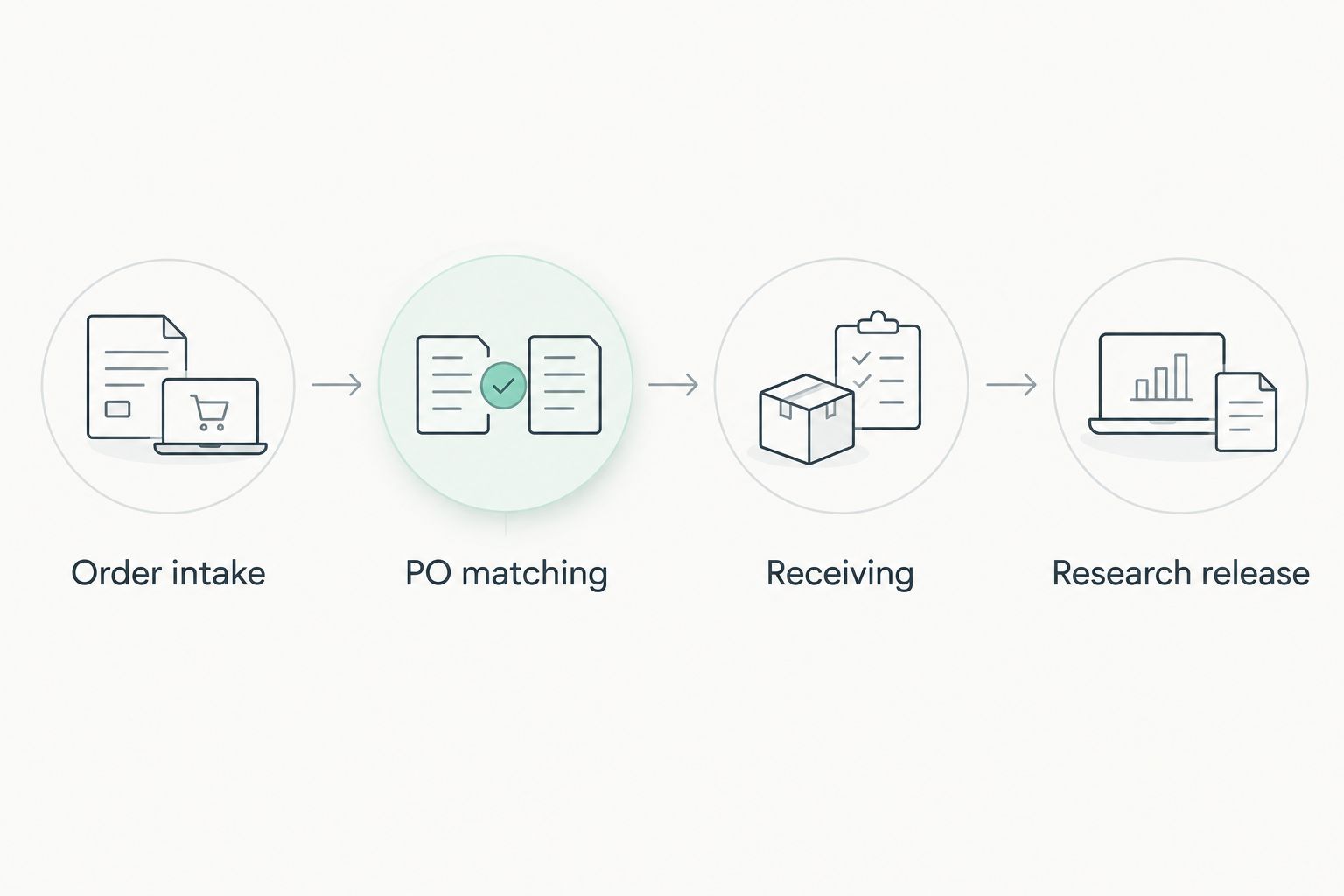
- Configure incoming confirmations to update acknowledgment information only. Do not mark goods received from an order confirmation or shipment notification.
- Match incoming lines to purchase-order lines using approved identifiers. Send ambiguous matches for review instead of relying on a description alone.
- Record received quantities from the receiving event. Preserve any outstanding quantity when a shipment is partial.
- Attach supplied lot documentation to the relevant receiving or material record. Do not assume an order-level attachment describes every shipment or lot.
- Keep research release separate from receipt. Apply your laboratory’s existing acceptance procedure before making the material available for research.
Expected result: purchasing can see the order relationship, receiving can record actual arrivals, and laboratory reviewers can assess material without losing the original purchasing trail.
Test before enabling routine imports
Run representative test cases through the complete workflow: a matched order, an unmatched confirmation, a partial receipt, and a repeated import of the same source record. These are test scenarios, not performance benchmarks.
Check that the repeated import updates or rejects the existing record according to your design rather than creating a second commitment. Check that a partial receipt leaves the outstanding balance visible.
Keep the first production import under review. Compare its resulting records with the source documents before allowing the workflow to operate without that review gate.
Update procurement whenever a supplier order changes
An event-driven variant is appropriate when the supplier authorizes access and your procurement system has a supported receiving endpoint or integration service. It is not a capability you can enable from an ordinary buyer account.
For a 2026 automation project, confirm which side owns the connector, credential rotation, incident response, and change approval before requesting technical access.
Supplier-authorized WooCommerce webhooks
The following setup belongs to an authorized supplier administrator. It describes WooCommerce configuration, not a confirmed Peptides777 service or a request for the buyer to access the supplier’s store administration.
- In WooCommerce administration, open WooCommerce, then Settings, Advanced, and Webhooks. Select Add webhook.
- Enter a descriptive Name and select the relevant Topic, such as Order updated, for the approved workflow.
- Enter the integration service’s approved HTTPS endpoint in Delivery URL. Set a controlled Secret for signature verification.
- Set Status to Active only when the receiver is ready, then select Save webhook.
- Have the integration owner verify the
X-WC-Webhook-Signatureagainst the raw request body using the configured secret and WooCommerce’s documented HMAC-SHA256 method. - Map only the authorized records and fields. Apply duplicate protection before updating procurement.
Expected result: an authorized order event reaches a verified receiver and updates the matching procurement record without creating another purchase order.
A WooCommerce delivery identifier can help identify repeated deliveries. Business-level duplicate protection must also consider the supplier, order, and line being updated; a new event does not necessarily represent a new purchase.
Do not write every supplier status directly into a procurement status field. Maintain an explicit translation that preserves approval, receipt, and research-release controls.
Troubleshooting
A repeated import creates another purchase order
The workflow is treating every incoming record as a new purchase. Match on a stable combination of supplier identity and supplier order reference, then apply the destination system’s documented update behavior.
For line-level changes, retain line identifiers when supplied. If a reliable match is impossible, stop for review rather than merging by description.
Quantities look correct but receiving is wrong
Check the unit mapping and the source event. A container count is not a material quantity, and an order acknowledgment is not evidence of receipt.
Correct the mapping before processing further records. Preserve the correction history instead of overwriting the original source document.
The connection returns HTTP 401 or HTTP 403
HTTP 401 indicates an authentication problem; HTTP 403 indicates that the server refuses access. Check credentials, permissions, and the endpoint’s access requirements with the system owner.
Do not solve an access failure by sharing an administrator account or disabling verification. Obtain the narrowest authorized access suitable for the connector.
A supplier update overwrites laboratory review
The connector has too much authority over destination fields. Remove approval and research-release fields from supplier-controlled updates, then restore the affected records through your normal correction process.
Supplier acknowledgment, shipment progress, physical receipt, and laboratory acceptance need distinct ownership even when they share an order reference.
Lot documentation cannot be matched
Check whether the document refers to the actual received lot rather than only the ordered item. Keep the receiving record unresolved until the required relationship is established.
Use Contact Us to ask about order references or documentation for the relevant purchase. Ask about integration access separately; an order-support response does not itself authorize an API connection.
Customize your workflow
Once order matching and receiving work correctly, expand the connection to project codes, internal material references, and document-review assignments supported by your procurement system. Add fields because a named team uses them, not because a source payload contains them.
Keep credentials in your organization’s approved secret-management system. Restrict access to order documents and avoid placing credentials or unnecessary personal information in connector logs.
For your 2026 maintenance plan, assign an owner to review mapping changes whenever either system changes. Re-test duplicate handling and receiving separation before accepting a revised connector into routine use.
FAQ
How do I connect peptide orders to lab procurement software?
Start with an approved import that matches supplier confirmations to existing laboratory purchase orders. Map identifiers, quantities, units, and document references, then test receiving and duplicate handling before adding automation.
Can I connect a supplier’s WooCommerce store from my customer account?
A customer account does not grant WooCommerce administrative or integration access. Use buyer-accessible records unless the supplier explicitly authorizes an API or webhook connection.
Is a file import better than a webhook for peptide procurement?
A file import is the better starting point when you control purchasing records but do not have authorized supplier-system access. A webhook fits an approved event-driven connection with an authenticated receiver and a named integration owner.
Does an order confirmation mean my laboratory has received the peptides?
No. An order confirmation acknowledges an order; your receiving team must separately record the actual delivery and any outstanding quantities.
Can I use a supplier’s purity statement as laboratory acceptance?
A supplier’s purity statement does not replace your laboratory’s material-acceptance process. Keep supplier claims, lot documentation, receiving records, and research-release decisions distinguishable.
How do I prevent duplicate peptide purchase orders?
Match incoming records using stable supplier and order references before creating anything new. Test repeated imports and repeated event deliveries, and route ambiguous matches for review.
Should procurement automation mark research compounds ready for use?
Procurement automation should not independently grant research release. Record receipt separately and retain the acceptance checks required by your laboratory’s procedures.
One last thing
The most useful automation test is importing the same confirmation again. If another purchase order appears, the connection is not ready—regardless of whether every field looks correct. Fix record identity before adding more events, fields, or destinations.